
I Locked the Door and Left the Window Open

I Locked the Door and Left the Window Open

New here? Start with who I am now, then come back.

Last week I deleted a document I never should have made.

A few days into this series, I typed my Social Security number and my passport number into a document on my computer so I’d have them handy. I mentioned it once. Last week I finally deleted it, and I felt good about that.

Then a quieter question showed up. If I’d done it once without thinking, where else had I done it? And how would I even find out?

What

Here’s the thing about me and security: I take it seriously. I use a VPN. I don’t click links I’m not sure about. I know what phishing looks like. I don’t accept friend requests from people I don’t know, and I’m wary of ads.

Every one of those habits faces outward. They guard the front door.

What I’d never done was turn around and look inside my own house. My computer is where I save everything. So when I needed a number, I put it wherever I was working. I never thought of that as a security question. It was just my computer.

So this week I went looking. I used the search box on my Mac and the search bar in Photos, and typed words like passport, Social Security, SSN, account number, and password.

My files were the smaller surprise. There weren’t many hits, but there were old spreadsheets with lists of accounts and financial information I’d made years ago and forgotten. I deleted a lot of them.

Photos was the big one.

When I create a new password, I save it in my password manager. Then, to check that it saved correctly, I take a screenshot. The checking part is sensible. What I never did was delete the screenshot afterward.

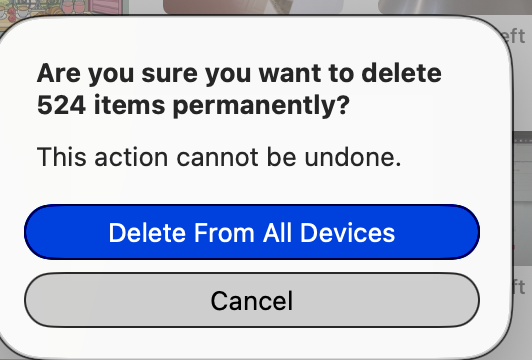
I deleted more than 520 of them.

Five hundred and twenty-four pictures of passwords  and outdated screenshots no longer needed, sitting in my photo library right alongside every other picture I’ve taken.

So what

Our parents didn’t face this, and not because they were more careful. Their numbers lived with custodians. The bank kept the account numbers. The Social Security card sat in a drawer with the passport. Nobody had a copy on a phone, because there was no phone to put it on.

Now we are our own custodians. And our tools make copying effortless: a screenshot, a quick note, a spreadsheet “just for now.” Each copy feels like being organized. And really, every copy is one more window left open in a house we thought was locked.

For five weeks this series has been about making things findable for the person who will act for us. This week is the other half of the same job: making sure the wrong things aren’t findable.

The map says where things are. It never holds the numbers. The numbers belong in one locked place and nowhere else.

That isn’t a failing. We’re the first generation with photo libraries full of screenshots, and nobody taught us to clean up after them. We’re not behind. We’re first.

What if

So here’s this week’s step: one 20-minute search.

  1. Search your computer. On a Mac, press Cmd + Space. On a PC, use the search box in File Explorer. Try these one at a time: passport, Social Security, SSN, Medicare, account number, routing, PIN, password, date of birth.
  2. Use the best trick. Type the last four digits of your Social Security number. That finds any file holding the real number, whatever the file is called.
  3. Search your photos. On a Mac or iPhone, the Photos search bar reads the words inside your pictures, screenshots included. Use the same words. Then scroll your Screenshots album. You’ll recognize a bank page or an ID card at a glance.
  4. Move it, don’t just delete it. If you still need the information, put it in your password manager or on paper in your one place. Then delete the copy.
  5. Empty the trash. Photos keeps deleted pictures in Recently Deleted for 30 days. Until you empty it, they’re still there.

And one new habit. When you need to check that a password saved correctly, open your password manager and look at it there. No screenshot needed.

A small warning: if Photos says it’s still “analyzing your library,” a search for SSN may come back empty for now. Search again in a few days.

Email is next for me. I’ll tell you what I find.

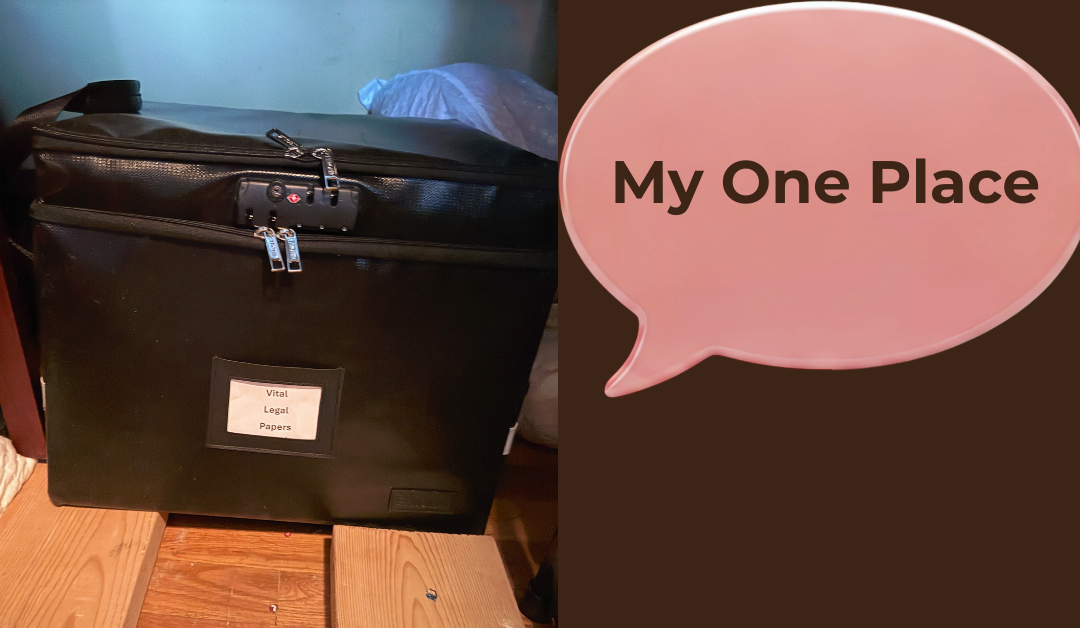
I know the image below looks scary, but it was actually freeing.


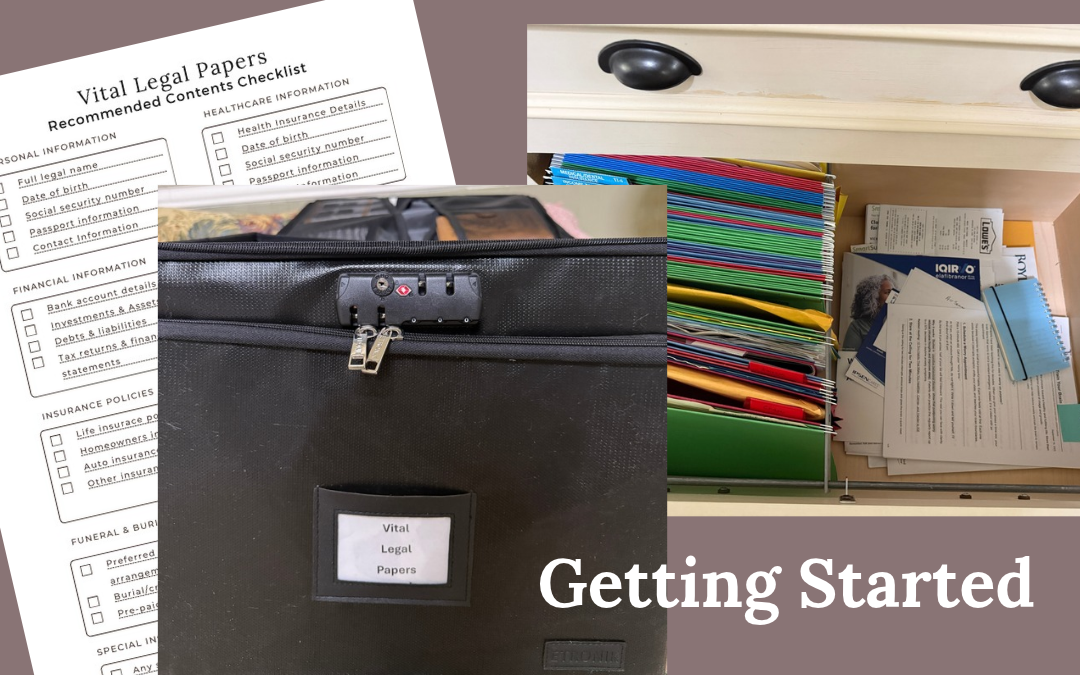
If you’d like the full list of what belongs in your one place, start with my free Vital Legal Papers Checklist. Get the free checklist →

The Vital Papers Kit goes one step further. It never asks for a password, a PIN, or an account number, only where things are kept. And it has a page that teaches you to apply the same rule to everything else on your computer. Get the Vital Papers Kit, $27 →

We’re not behind. We’re first.

The Letter for Later

The Letter for Later

New here? Start with who I am now, then come back.

This week’s step was supposed to be the easy one.

For a month now, I’ve been showing you every step of getting my own papers findable. I chose my one place. I gathered section one of my checklist with a forty-five-minute timer. I wrote down the names of my five most important accounts. And every week, one item on my own audit stayed exactly where it was: letter of instruction — not started, nothing written down.

This week I started it. I didn’t need the full forty-five minutes. The writing itself went quickly. It was everything around the writing that took longer than I expected.

What

A letter of instruction isn’t a legal document, and it doesn’t replace a will. The will tells the court who gets what. The letter tells your family what to do first and where to find things, in your own words.

I wrote mine to our daughter, who will be our executor.

The first instruction was easy: call your brother first. Then I wrote the part I cared about most. She holds the legal role, but I don’t want her carrying this by herself. The two of them should work through it together.

After that I wrote down some of the main things she’d need. And just like the afternoon I gathered my papers, every line I wrote raised another question I didn’t have an answer to yet.

Then it got harder, in two ways I hadn’t planned for.

The first was simply realizing what I was writing. This is a letter that will be read after I’m gone. I knew that when I sat down, of course. But knowing it and writing “call your brother first” to your own daughter are two different things. I got emotional, and I’m not embarrassed to say so.

The second was the tone. I felt a lot of pressure not to add to the pressure my children would already be feeling. I didn’t want an emotional letter. The things I want to say to them as our children belong somewhere else, in other ways. But I didn’t want it to read cold, either, like an assignment to be checked off a list. I wanted something steady that they could lean on.

I didn’t find that tone in one sitting. I’m not sure anyone could.

And then I came to the bottom of the page, where a signature goes.

By the time our children open this letter, one of us, my husband or me, will already be gone. So, the name at the bottom will belong to whichever of us is still here. I sat with that longer than with anything else I wrote.

So what

Here’s what I understand now that I didn’t a week ago.

Our parents didn’t have to write this letter. When my mother died, the first instructions came from other people: a lawyer, a bank officer, a funeral director who had done this a thousand times. They spoke in a calm, practiced, professional voice, and the family followed it. Someone else carried the tone.

That voice is mostly gone now. Nobody is going to call our children and tell them what to do on the first morning. So, the first instructions they get will be the ones we leave, and they’ll hear them in our voice.

That’s why the tone was so hard. The will is written for a legality entity, in our state, the Clerk of Court. The letter is written for a person, on the worst day of her life, and nobody taught us how to write that. The kind of letter we already know how to write, the love letter or the thank-you note, isn’t this one. A checklist isn’t this one either. It sits somewhere in between, and we’re the first generation that has to work out where.

That isn’t a failing, ours or our parents’. It’s simply new. We’re not behind. We’re first.

What if

So, here’s this week’s step, and it’s smaller than it sounds: write the first page. Just the first page.

1. Who should be called first? One name, or a short list in order.
2. Where is the map? One sentence pointing to your one place.
3. One thing you want them to know before they start. Mine was that they should do this together.

The same rule applies as last week: names, not numbers. The letter says who and where. It never holds a password or an account number.

Here’s the part I most want you to hear. Your first draft is allowed to be a draft. Mine is. I dated it and put it in my Vital Legal Papers Box, which I’m only now starting to fill. I plan to keep adding to it and revising it until I’m satisfied with what it says and how it says it. The specifics will change, too. The people and companies they need to call first won’t stay the same for the coming years.

A letter you revise five times is worth more than a perfect one you never start. And a first page in the box today is already more than anyone had to go on yesterday.

The Morning I Finally Started Gathering Everything

The Morning I Finally Started Gathering Everything

I’ve been talking about getting Legacy Ready for weeks. Last week I picked one place where my Vital Legal Papers Box would reside – on the floor in the back of the hall closet.

This morning, I finally stopped talking and started doing it.

New here? Start with “Who Is Vicki Peel Now?” – then come back.

Now it’s time to start gathering my “stuff” and putting it into the box (or wherever it needs to go).


Just 45 minutes

I set a timer for 45 minutes. Why? 45 minutes is not overwhelming – it’s not even an hour! There is an end to this step. After all, let’s be honest. I wasn’t relishing getting started on this. I can write about things all day long. It’s the implementation part – the getting started part that I resist.

But, that 45 minutes went really fast. And here’s what happened.

The plan was to complete the Personal Information section of the Vital Legal Papers Checklist. Wow! Only five things to complete, and I already knew all that. After all, I knew my whole name, date of birth, social security number. I’ll be finished in five minutes, I thought.

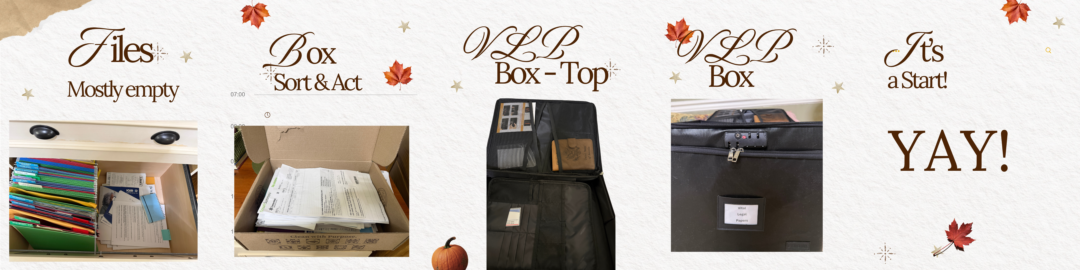
I looked in the two places where I knew (or thought I knew) personal documents were stored – in the filing drawer in my office and in a box where I started putting “stuff” that had to be sorted and decisions made.

I found our birth certificates immediately, and I had forgotten that I had put them in the file drawer. They were even labeled in a file folder.


Then the questions started popping up

What do I do with the information? I decided to start a Google doc listing all the information in the first section of the checklist.

Then it occurred to me. Not everything will need to go in the VLP Box. So, after I decide where something should be located, I need to name the location for whoever needs to know. So, I added that to the data doc I was preparing

Next, I realized that for some things, certain actions need to be taken with the information. For instance, I listed three phone numbers: my personal cell phone, the landline phone, and my Google Voice number. Listing the numbers doesn’t tell anyone what to do with them – the phone carrier, contact information and how to cancel the account. I saved that part for another work session.

Because my husband wasn’t at home at the time, I made a note to ask him a few questions about some of his data. I saved that for another time.


Then the bigger picture emerged

I soon realized A Vital Legal Papers Box isn’t really about gathering papers. It doesn’t even have to be a box. It can take whatever form works for your situation.

Because finding the information isn’t enough. It’s about leaving instructions.

Whoever eventually needs it also needs to know what it means, where related information is located, and sometimes what they’re supposed to do with it.

I’m not just gathering papers. I’m trying to leave directions.


Distractions creeping in

I soon realized how easy it was to get distracted.

I stopped to read a newspaper article from 1931 – my father was on the 3rd grade honor roll!

And in another newspaper article from 1982, there was a picture of myself and one of my students talking about attending a state meeting.

That 45 minutes was flying by!


The results

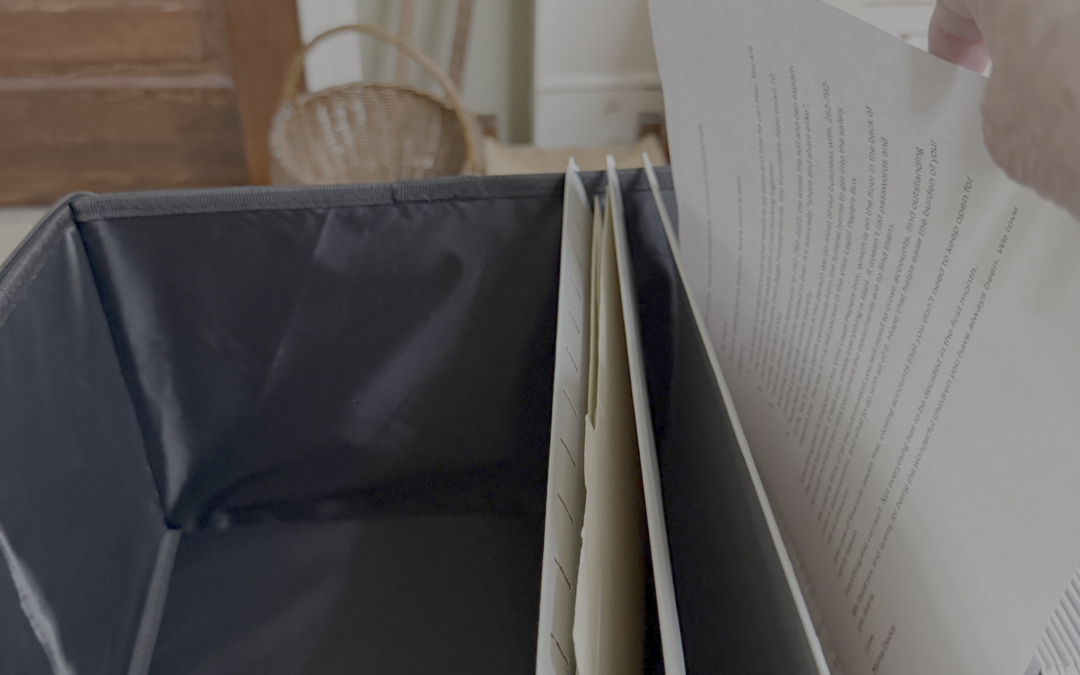
I checked out my VLP Box. There were two zippered sections. The top section was about 2 inches deep with storage pockets. The bottom section was simply a big empty space. I was surprised to see there was not an organized way to add files. It looked as though you just dumped stuff in there. I “filed” that thought away to figure out another day.


      Here’s what I accomplished in my 45 minutes.
      • Started a Google doc listing all requested personal information, along with where the items were located, which is especially important if they are not going to be in the box.
      • Added our birth certificates, passports, and the checklist to the box.
      • Made notes to identify information I needed to add later.
      • Identified how to use the VLP Box to store items and information.
      • This was only 45 minutes. I didn’t quite finish the Personal Information section. I certainly didn’t finish my Vital Legal Papers Box.

But I started.

And I learned something I couldn’t have learned by thinking about it for another year: the questions don’t all show up until you begin.

That’s what I’m going to keep doing—working through this one piece at a time, noticing what’s missing, and building a better process as I go.

I’m also creating the workbook I wish I’d had beside me this morning. More about that next week.

Because getting Legacy Ready isn’t about getting everything perfect. It’s about making things a little clearer for the people who may someday have to step in.

This was a successful first step.

I’d been planning to do this for several years. And today, I accomplished part of it. It actually excites me about continuing the process. What a load off my mind that will be when I finish it.

If you’d like a copy of the checklist I used, it’s free on my website home page – https://HERLifeHacks.com
.

The Job I’m Leaving My Children

The Job I’m Leaving My Children

When my mother died, we went looking for her papers.

I really didn’t know where to start or what to do. As the person in charge, I knew I had to get the death certificates from the funeral home (you need more than you think) and then go to the Clerk of Court in our county. That’s where legal documents are handled. It may be called something else in other parts of the country. That was where I got the list of what I needed to do to be able to close the estate.

But just having the list of what needed to be done was only the beginning. The list didn’t tell me how to gather the information, only that it needed to be submitted.

For a long time, I wished I had been given more information, more instructions, more help. And maybe my mother should have told me where documents were and what was the status of her estate.

But I had this nagging suspicion that asking those kinds of questions was like hastening her death, something that I wanted to avoid at all costs. As it turned out, the costs kept me unaware and unprepared for what was to come.

Things became clearer as I started thinking about making the kind of preparations I wished I had when my mother died.


She left us the system she was given

My mother did exactly what her generation was taught to do.

The will went to the lawyer, who kept it. The deed went in the safety deposit box at the bank, which kept it. The insurance company kept the policy and mailed a paper reminder every single year, whether she wanted one or not.

Her records were scattered — but they were scattered across institutions that held them for her.

That’s the part we’ve forgotten. Her generation had custodians. Getting your affairs in order was barely a task, because you didn’t need a master list. You needed to know who to call, and there were maybe five people to call.

The system worked. Not because she managed it well, but because it managed itself.


Then the custodians disappeared

Look at what happened in one generation.

Statements stopped arriving in the mail. Accounts moved behind logins. Money spread out across banks and brokerages and apps. Photographs went into a cloud that sends nobody a reminder about anything.

The paper trail that used to lead to a person now leads to a screen that wants a password.

Nobody is keeping the master list anymore. No institution is holding your affairs on your behalf. That job got handed to each of us individually — quietly, with no announcement, no manual, and nobody to teach the method.

So here’s what I’ve come around to, and it changed how I think about all of this:

This is a brand-new job. It appeared in one generation, and that generation is ours.

We are the first people who have ever had to do it. That isn’t a personal failing on anyone’s part. It’s a gap in the world, and we happen to be standing in it.


The part nobody says out loud

There’s a person on the other side of this work, and they have a name and a legal role.

Executor.

Your child, most likely. And they will do that job during the worst weeks of their life.

They’ll be grieving. They’ll be performing an unfamiliar legal role with real deadlines, in front of institutions demanding documents they have never heard of. Every one of those documents will need to be found before it can be handed over.

And they’ll be doing all of it while standing in your kitchen holding your dishes, trying to work out whether keeping them is love or clutter — and whether letting them go is freedom or betrayal.

Grief, an unfamiliar legal job, and guilt over objects. All at once, in the same house, in the same week.

That’s what we’re leaving. Not the estate — the search.

Which is why the work isn’t organizing, and it was never about tidiness. Every hour we spend on this now is an hour they don’t spend searching.


This week’s step: choose the ONE place

Not a system or a filing method or even an afternoon of sorting.

One place. A single physical location where your important papers — or notes pointing to them — will live from now on.

Think of it as the first pin on a map. Everything else you’ll eventually do needs somewhere to go, and without a destination you’re only moving paper into a slightly better pile.


How to choose it

The checklist I give away tells you what belongs in the one place, that even that list is only a starting point.. It doesn’t tell you how to pick the place. That’s the part I’m working out this fall, and here’s what I have so far.

Someone else has to find it without you. The test: could you tell a person over the phone, in one sentence, exactly where it is? “The blue accordion folder in the hall closet, top shelf.” If it takes a paragraph, it’s the wrong place.

It holds pointers, not everything. Some originals have to live elsewhere — a will at the bank, a deed at the county, a policy with the company. The one place holds a note saying where each one is. You’re building a map, not a vault.

Never account numbers, PINs, or passwords. A pointer says where, never what opens it. That’s the security you need to incorporate.

It has to survive you being unavailable. If the only key is on your keyring or the only password is in your head, you’ve created more problems.

Boring and obvious beats clever. No hiding places. The person who needs this will be tired and sad and not thinking clearly.

It has to be one. Not three good places. Just one. You can add a second later, but you almost certainly won’t need to.

I’ve chosen a fireproof file box that lives on the floor of the closet under the stairs. It is in the very back and I felt that was a safe enough space that anyone with knowledge of it could get to.


The first question I couldn’t answer

My will is in our safety deposit box at the bank, which felt responsible right up until I asked myself something simple: how would my children actually get into it?

And the answer to that may vary depending on legal requirements where one lives.

For my mother, the first step was to get death certificates from the funeral home. Since they are public documents, I didn’t have to prove I was the executor of the estate. Every time you have to close an account in the name of the deceased, you may need a death certificate, which is why you will need several copies. I started with 10 copies, which were enough for my mother’s estate.

When my mother-in-law died, my husband was the executor, and he took a death certificate to the bank and was able to get the will from the safety deposit box. They also inventoried everything that was in the box at that time.

Legal procedures may vary from location to location. One thing that is true in the United States is that the funeral home notifies the Social Security office to stop payment of Social Security checks.

But as laws change, procedures one must follow also change.

That’s what doing this in public keeps giving me. I keep finding the questions I would have skipped if I were only teaching it.


Your turn this week

Choose your one place. That’s all.

Don’t fill it. Don’t sort anything. Don’t set aside an afternoon. Walk through your house, pick the spot, and say it out loud to somebody.

Nobody taught our parents how to do this, and nobody taught us either. We’re not behind — we’re first. So we build the method as we go, one small step a week.

If you want to know what will eventually go in your one place, the Vital Legal Papers Checklist is free, and it’s the list I’m working from myself. I’m sure I’ll find things to add to it. Just click the title below to get your copy.

Vital Legal Papers Checklist

Next week we start putting things in. I’ll set a timer and keep it under one hour.

I Teach This. I Hadn’t Finished It Myself.

I Teach This. I Hadn’t Finished It Myself.

This fall, I’m getting my own affairs in order — in public. You’re welcome to walk along.

Last week I pulled out my own Vital Legal Papers Checklist — the one I made for my readers — and did something I’d been putting off longer than I care to admit.

I checked my own work.

The results were mixed.


Starting to Build the System

Some things passed. My will is exactly where it should be — in the safety deposit box at the bank. My passwords are all current, too. I’d love to tell you that’s because I’m disciplined, but the truth is simpler: I use a password manager, and it does the remembering for me. That’s not discipline. That’s a system. (And that difference is going to come up again and again this fall.)

Then it got humbling.

My insurance papers? I have most of them. But “most of them” and “all in one place” are two very different things. Some are filed where they belong. Others are — well, elsewhere. I know it’s somewhere is a phrase I hear from readers all the time. It turns out I say it too.

And then the part I’d been avoiding entirely: the notes for my children. The page that tells them where everything is, who to call, and what they’d need to know if I weren’t here to answer questions.

I haven’t written a word. Not a rough draft. Not a list on the back of an envelope. Nothing.


What’s the Cost of Not Doing

Here’s the thing that struck me as I sat there with my own checklist: my papers are in better shape than my family’s ability to find them. The will exists — but the map to it lives only in my head. If something happened to me tomorrow, my family wouldn’t be starting from nothing. They’d be starting from guessing. And I’m not sure that’s much better.

I know what that guessing costs, because I’ve lived it from the other side. When my mother and my mother-in-law passed, my husband and I served as executors of our parents’ estates — and losing them taught us a lot. I learned firsthand what it means to sort through everything — the papers, the accounts, the decisions — while you’re grieving. It’s a burden I decided long ago my children would not carry.


What? How?

But deciding, it turns out, isn’t the same as finishing.

And since we’re being honest, here’s one more confession. Sitting there with my own checklist, I realized it tells you what to gather — but not how. Where should the originals live, and where should the copies go? What’s fine in a box on a shelf, and what belongs somewhere more secure? What needs to be written down for your family, and how much information is enough? My checklist doesn’t answer those questions yet.

Neither do I. That’s what this fall is for.

As I work through my own checklist, I’ll be asking those questions out loud, figuring out the answers, and adding what I learn — which means the checklist you download today is going to keep getting better as we go. You’re not just watching me get my affairs in order. You’re watching the how get built.

So this fall, I’m finishing — in public. Each week I’ll take one step toward what I call being legacy ready: papers findable, accounts written down, the house a little lighter, the stories saved. I’ll show you exactly what I did, how long it took, what I put off and why, and what I’d tell a friend to do differently.

Not because I enjoy confessing. Because I know from thirty-four years in education that people finish things when someone is doing it alongside them — and almost never when they’re alone at the kitchen table with a stack of folders.


Promises…Promises…

A few promises about what this series will not be.

It won’t be morbid. This is about living with your affairs in order, not dwelling on the end. A folder full of answers makes life lighter, not heavier.

It won’t be overwhelming. One step a week. Some steps take an afternoon. Most take less.

And it won’t require you to be organized already. You can start where you are. Clearly, I did.

If you’d like to walk along with me, start where I started: the Vital Legal Papers Checklist. It’s free, it’s short, and this week your only assignment is the same one I’m giving myself — print it and look it over. Don’t gather a single document yet.


The Real Question

So let me ask you what I had to ask myself: if your family needed your important papers tomorrow, would they know where to look — and could they get to them?

I’d love to hear where you are with this. No shame in the answer. I just told you mine.

Next time: the first step I’m taking — choosing where everything will live.